Alt-Tab
Alt+Tab(알트탭)은 윈도우 3.0 이후로 마이크로소프트 윈도우에서 실행되는 단축키의 일반적인 이름이다.
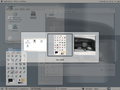
이 바로가기 키는 마우스를 사용하지 않고 애플리케이션 수준의 창 간 전환을 수행하며, 그러므로 작업 전환기(태스크 스위처, task switcher)라고도 부른다.(윈도우 비스타에서는 플립/Flip)
Alt+Tab ↹의 가장 일반적인 용도는 전체 크기의 창과 바탕 화면 간의 전환으로 짐작되지만 응용 프로그램 수준의 창을 가진 실행 중인 프로그램으로의 전환에 사용될 수도 있다. 그러므로 2개의 최근 작업 간의 전환을 위해 사용할 수 있다. 창 환경은 최상위 창(작업)의 Z-order 목록을 관리하며, 마지막으로 사용한 작업을 전면에, 아래에는 바탕 화면으로 둠으로써 최근에 사용한 작업이 가장 빠르게 전환될 수 있다.
Alt+Tab ↹ 자판 조합은 macOS, iOS (⌘ Cmd+Tab ↹), KDE, Xfce, 그놈 등의 다른 운영 체제와 데스크톱 환경에도 통합되어 있다.
역사
창 간 전환을 위한 Alt+Tab ↹ 키 조합은 윈도우 1.0 이후의 모든 버전의 윈도우에 존재해왔다. 그러나 윈도우 3.1이 등장하기 전까지 창 간 전환 시 사용 가능한 창 목록을 시각적으로 표시하는 부분은 없었으며, 이 기능이 등장했을 당시 디스플레이 제어판 애플릿에 고속 Alt+TAB 전환 체크상자로 도입되었으며 내부적으로 쿨스위치(CoolSwitch)라는 이름을 사용하였다.[1]
쿨스위치 이전에 Alt+Tab ↹ 조합은 Alt+Esc(이 또한 창을 전환했음)와 비슷하였으나 Alt+Esc는 각 키 입력에 즉시 개별 창을 다시 그린 반면 Alt+Tab ↹은 창을 최상위로 이동시켰으나 Alt 키가 해제되기 전까지 이것들을 다시 그리지는 않았다.
사진
-
-
 컴피즈 (플립 스위처)
 -
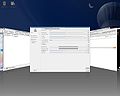 컴피즈 퓨전 (커버 스위처)
 -
 Beryl
Beryl -

-
 Kwin
Kwin


같이 보기
각주
외부 링크
Content Disclaimer
Informasi ini disarikan dari Wikipedia dan disajikan kembali untuk tujuan edukasi. Konten tersedia di bawah lisensi CC BY-SA 3.0. Kami tidak bertanggung jawab atas ketidakakuratan data yang bersumber dari kontribusi publik tersebut.
- The information displayed on this website is sourced in part or in whole from Wikipedia and has been adapted for the purpose of restating it. We strive to provide accurate and relevant information, however:
- There is no guarantee of absolute accuracy. Wikipedia is an open, collaborative project that can be edited by anyone, so information is subject to change.
- It is not intended to constitute professional advice. The content displayed is for informational and educational purposes only. For important decisions (e.g., medical, legal, or financial), please consult a professional.
- Content copyright. Wikipedia is licensed under the Creative Commons Attribution-ShareAlike License (CC BY-SA). This means that content may be reused with appropriate attribution and shared under a similar license.
- Responsible use. Any risk arising from the use of information from this website is entirely the responsibility of the user.